How Apple can improve Safari in iOS 15
- The controversial new Safari design moves the address bar to the bottom of the display.
- It's led to ways in how Apple can improve the experience before publicly launching it this fall.
The adaptable address bar ditches the bottom row of functions in favour of a menu-based system where common functions, like refreshing, downloads, sharing and other actions are located. You can also switch between tabs by swiping left and right on the address bar, and quickly carry out a search at the tap of a button.
 However, Apple has come under intense pressure from beta testers to change the UI again, and revert to the previous design. Users have described the experience as hard to use and impractical, with the once easy to use options now buried in menus. This is mainly due to the number of touch points in the area at the bottom of the screen – in iOS 15 beta 4, there are 7, consisting of the navigation icons, address bar spaces, share icon, tabs icon and badly placed refresh icon.
The company is now responding to feedback and has continued to evolve the design in iOS 15 beta 4. With the latest iPadOS 15 beta, it even brought back the ‘classic’ tab UI and made the new design optional. However, it still has work to do in improving the UI on iPhone.
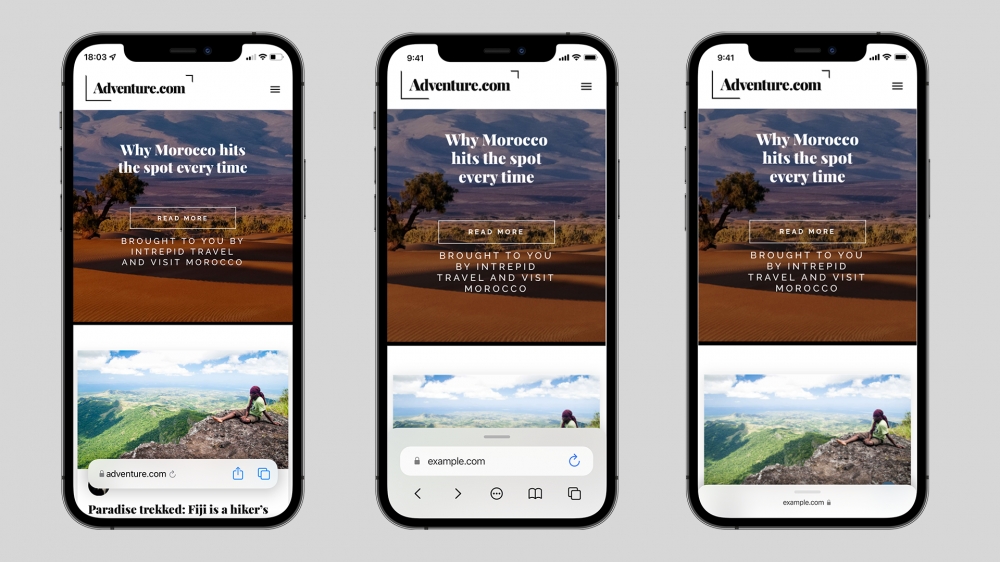 To address this, Apple shouldn’t return to the old design completely. A one-handed approach makes sense for ease of use, especially as iPhone models continue to get larger. As laid out in this concept by Apple Scoop, an improved UI should consist of the current address bar design, but focus on actions commonly used, and reduce the reliance on the awkward collapsible UI elements.
While it could still obscure content, the jittery animations and movement logic have been replaced with a user-collapsable palette with a simplified address bar (two touch points, including the refresh button). Navigation underneath this UI reduces clutter and sits near options for history, tabs and the more menu.
Dragging this upwards could reveal any open tabs in the same ‘palette’, or alternatively, open the ‘more’ menu, revealing options for Reader View, Privacy Report, downloaded files and the same share options as currently.
When scrolling, the UI collapses to allow the user to focus on their content, but will reveal itself again after moving up the page, or using the same modal view.
Recommended by the editors:
- No More September iPhones? Apple's Strategy Shift Changes Everything
- iPhone 18 Rumors: Apple Reportedly Testing Under Display Face ID
- Foldable iPhone Could Be Apple’s Most Expensive Phone Ever At $2,399
- 200+ Best Winter Wallpapers for iPhone & Android (Free 4K/HD)
- iPhone Fold and iPhone Air 2: Rumors, Release Date, Design, Cameras, and More
Published to Apple Scoop on 1st August, 2021.