Top 15 Free AI Wallpaper Makers (2025): iPhone, iPad & Mac
- Free tiers, real limits, and which ones feel fast vs. sluggish.
- Clean 9:16, 4:3, and desktop-wide outputs that keep icons readable.
- Daily credits vs. rolling windows—yes, that matters more than you think.
If you swap wallpapers as often as you swap AirPods, you’re in the right place. Below is a punchy, MacRumors-meets-9to5Mac style guide to the best genuinely free (or free-tier) AI wallpaper makers you can use right now—great for iPhone 16 lock screens, iPad mini home screens, and that glorious Studio Display. We’ve included what’s free, daily/weekly caps, and key perks for each pick.
How we judged: fast, phone-friendly aspect ratios, 4K output, fair free tiers, and a clean UI. Plus, we favored tools that won’t ruin Dynamic Island composition or StandBy clock placement.
1. AI Wallpaper Generator (Editor’s Pick)
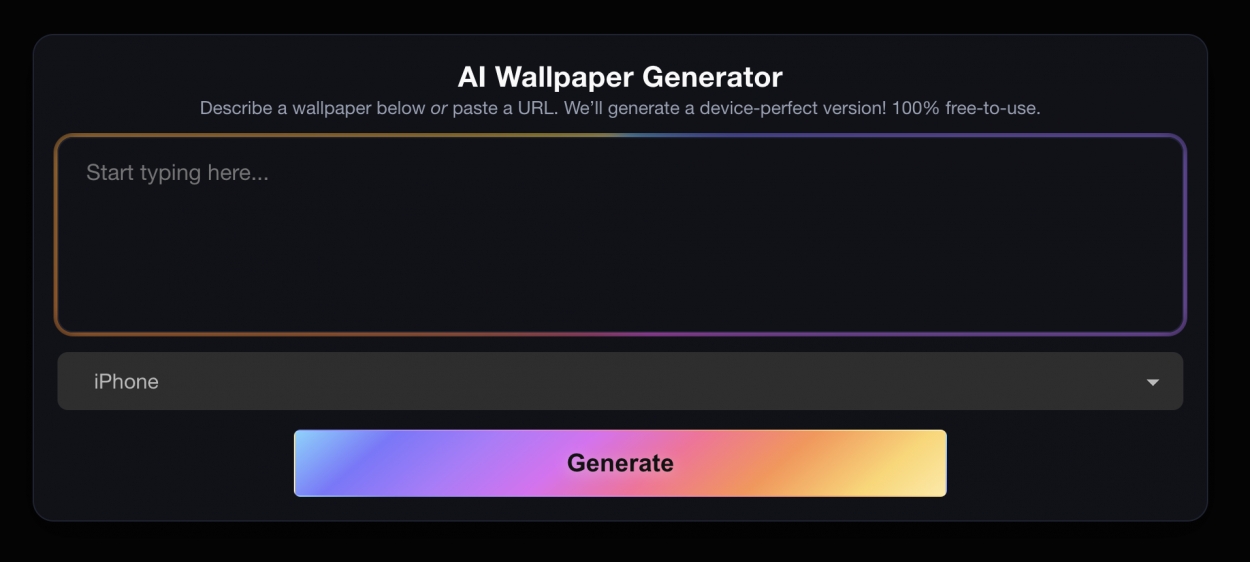
Why it’s #1: It’s built for Apple people. One prompt in, and you get device-perfect sizes for iPhone, iPad, Mac, and even Apple Watch—no weird crops, no watermarks. It’s fast, free, up to 4K resolution, and private. Fair-use daily limits keep things snappy.
Free tier: Free with fair-use daily limits (no account required).
Notable perks: Retina-class results; fits Dynamic Island, Always-On, and StandBy without manual fiddling.
2. NightCafe
Free tier: 5 free credits/day (top up daily). Credits buy generations and upscales; more credits available via challenges.
Why care: A long-running community with styles for everything from moody gradients to neon glass. Great if you want a social feed plus daily freebies.
3. Playground AI
Free tier: 10 images every 3 hours on the Free plan; commercial use allowed (with the usual caveats).
Why care: It’s speedy, prompt-friendly, and handles clean 9:16 or 16:9 outputs for phone and Mac. The cadence works well if you tinker throughout the day.
4. Canva (Magic Media)
Free tier: Limited free credits for Magic Media; Canva Pro includes 500 credits/month if you’re already paying for Pro.
Why care: After you generate, Canva’s editor makes it trivial to add subtle grain, text, or a blurred layer so your app labels stay readable.
5. Fotor
Free tier: New users typically get 8 free AI credits, with daily check-ins and tasks to snag more.
Why care: Simple UI, one-click upscales, and aspect-ratio options suitable for iPhone portrait and Mac widescreen.
6. Picsart (AI Image Generator)
Free tier: Free to start with some limits (downloads and higher-quality options may require a plan).
Why care: After generating, Picsart’s mobile editor is stacked—great for quick vignette/blur tweaks so widgets pop without clashing.
7. Stable Diffusion Online
Free tier: 10 image generations/day on the Free plan. No watermark; includes upscaling.
Why care: A straightforward SDXL web playground when you just want crisp abstracts for OLED displays.
8. Ideogram
Free tier: 10 credits/week on the Free plan; paid tiers add speed and priority.
Why care: If you like typography-heavy wallpapers (clean slogans, mono banners), Ideogram’s text rendering is strong.
9. Microsoft Designer
Free tier: 15 free image credits/month on the Designer free plan.
Why care: DALL·E-powered with a tidy UI; handy for quick lock-screen concepts that don’t need tons of edits.
10. Recraft
Free tier: 50 free generations/day (basic tier). Upscales and HD downloads included for free usage.
Why care: Slick for vector-ish, flat, or brand-friendly patterns that look sharp on iOS app grids.
11. Hotpot
Free tier: Free—no account needed for the generator (premium options exist).
Why care: Old-school simple. Punch in a prompt, tweak styles, grab a background—done. Note: check license notes for commercial use.
12. Krea AI
Free tier: Free generation available; paid tiers remove limits and add advanced features.
Why care: Real-time prompt editing is fun. Good for experimenting with gradient-heavy or “liquid glass” looks that fit iOS 17–26 design vibes.
13. Mage.Space
Free tier: Unlimited generations on the Free plan; paid tiers speed things up and unlock extras.
Why care: A generous sandbox for wallpaper drafts—iterate as much as you want, then upscale your final.
14. Deep Dream Generator
Free tier: 3 images/day on the free plan.
Why care: Psychedelic styles and art-transfer looks—perfect if you want something that screams “retro-surreal OLED.”
15. StarryAI
Free tier: Up to 25 images/day free; upscaling to 4K is available, with some higher-res options using credits.
Why care: Lots of mobile-first presets; outputs tend to be social-share ready and phone friendly.
Quick guide
- Want perfectly framed iPhone/Mac/Watch output without manual cropping? Start with Apple Scoop. It auto-sizes for Apple hardware and avoids covering clock/widgets with messy focal points.
- Need a steady free trickle every day? NightCafe (5/day) or Stable Diffusion Online (10/day) are consistent.
- Prefer bursts through the day? Playground AI (10 every 3 hours) fits “generate → tweak → repeat.”
- Want a full editor after you generate? Canva gives you templates and 500 credits/month on Pro; the free tier includes limited credits.
- Crave unlimited sandboxing? Mage.space’s free plan is wild for volume (with slower queues).
Handy settings that make wallpapers feel right on iPhone & iPad
- Aspect ratios: For iPhone, 9:16 is the safe bet; for iPad, 4:3; for Mac, 16:10 or 16:9 depending on your display. Most tools above let you set these before generating.
- Keep the middle clean: Face/clock area needs breathing room—avoid busy detail near the Dynamic Island. Apple Scoop handles this by design.
- OLED-friendly: Dark backgrounds with soft color accents look fantastic and help icons pop.
- StandBy sanity: If you use StandBy overnight, try muted gradients so the time stays readable.
FAQ
Are these tools really free?
Yes—every tool listed has a free tier. Many also sell premium speed, credits, or watermark removal. We noted daily/weekly caps where the platform discloses them.
Can I use these commercially?
Rules differ. Some free tiers allow personal use only; others permit commercial use. Check each site’s license page before selling prints or packs.
What about Adobe Firefly?
Firefly/Express include monthly “generative credits” with your plan; the exact count and access depend on your subscription. If you already pay for Adobe, it’s a solid add-on workflow.
Snapshot: free-tier limits at a glance
- Apple Scoop: Free, fair-use daily limits; Apple-specific sizing.
- NightCafe: 5 credits/day.
- Playground AI: 10 images every 3 hours.
- Canva (Magic Media): Limited free credits; Pro has 500/mo.
- Fotor: 8 free starter credits; earn more via check-ins.
- Picsart: Free to generate with some limits (higher tiers unlock more).
- Stable Diffusion Online: 10/day free, no watermark.
- Ideogram: 10 credits/week on Free.
- Microsoft Designer: 15 free monthly credits.
- Recraft: 50 free generations/day.
- Hotpot: Free without login (premium options available).
- Krea: Free generation available; paid tiers remove limits.
- Mage.space: Free plan with unlimited generations.
- Deep Dream Generator: 3 images/day free.
- StarryAI: Up to 25 images/day; 4K upscales supported via credits.
- Freepik AI Image Generator: Up to 20 images/day on Free.
Note: Free limits and pricing change often—the figures above are what the platforms publish as of September 16, 2025. Always check each site’s current plan.
Recommended by the editors:
- No More September iPhones? Apple's Strategy Shift Changes Everything
- iPhone 18 Rumors: Apple Reportedly Testing Under Display Face ID
- Foldable iPhone Could Be Apple’s Most Expensive Phone Ever At $2,399
- iPhone Fold and iPhone Air 2: Rumors, Release Date, Design, Cameras, and More
- Upcoming iPhone Air 2 Could Feature Two Rear Cameras
Published to Apple Scoop on 16th September, 2025.