Free Download: All Official iPhone 17 Stock Wallpapers in HD 4K
- New phone vibes without the new phone bill.
- Apple's iPhone 17 series released today, along with new wallpapers!
- All of Apple's stock wallpapers (iPhone 17, iPhone Air, 17 Pro, 17 Pro Max) are available here for free download.
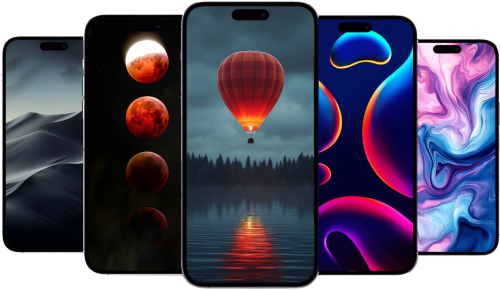
Apple’s new iPhone 17 family, unveiled today in Cupertino, brings fresh hardware for—and a fresh batch of wallpapers to match. If you love that “new phone” look (without necessarily buying a new phone), these official-style images are crisp, high-contrast, and built to make widgets pop. And yes, they look great on older models too (iPhone 14/15/16, etc).
All iPhone 17 Default Wallpapers
Apple iPhone 17 Official Default Stock Dark Mode HD Wallpapers for Apple iPhone
Apple iPhone 17 Official Default Stock Grey Silver HD Wallpapers for Apple iPhone
Apple iPhone 17 Official Default Stock Blue HD Wallpapers for Apple iPhone
Apple iPhone 17 Official Default Stock Green HD Wallpapers for Apple iPhone
Apple iPhone 17 Official Default Stock Purple HD Wallpapers for Apple iPhone
More iPhone wallpapers
All iPhone Air Default Wallpapers
Apple iPhone Air Gold Light Apple iPhone 17 HD Wallpapers for Apple iPhone
Apple iPhone Air Gold Dark Apple iPhone 17 HD Wallpapers for Apple iPhone
iPhone Air Default Stock Blue Light Apple iPhone 17 HD Wallpapers for Apple iPhone
iPhone Air Default Stock Blue Dark Apple iPhone 17 HD Wallpapers for Apple iPhone
iPhone Air Default Stock Black Light Apple iPhone 17 HD Wallpapers for Apple iPhone
iPhone Air Default Stock Black Dark Apple iPhone 17 HD Wallpapers for Apple iPhone
More iPhone wallpapers
All iPhone 17 Pro & 17 Pro Max Default Wallpapers
Official iPhone 17 Pro And 17 Pro Max Default Stock Silver 2025 HD Wallpapers for Apple iPhone
Official iPhone 17 Pro And 17 Pro Max Default Stock Silver HD Wallpapers for Apple iPhone
Official iPhone 17 Pro And 17 Pro Max Default Stock Orange 2025 HD Wallpapers for Apple iPhone
Official iPhone 17 Pro And 17 Pro Max Default Stock Orange HD Wallpapers for Apple iPhone
Official iPhone 17 Pro And 17 Pro Max Default Stock Blue 2025 HD Wallpapers for Apple iPhone
Official iPhone 17 Pro And 17 Pro Max Default Stock Blue HD Wallpapers for Apple iPhone
More iPhone wallpapers
How to change your wallpaper on iPhone (quick)
- Open Settings → Wallpaper.
- Tap Add New Wallpaper.
- Choose from Apple’s categories or Photos (for your downloads).
- Set it for Lock Screen, Home Screen, or Both.
- Long-press the Lock Screen later to switch styles in a second.
Small styling notes: consider turning off Perspective Zoom if you want icons and widgets to sit perfectly centered; Leave Depth Effect on for portraits to give the clock a layered look.
Why these wallpapers shine on the iPhone 17 lineup
- Always-On + 120 Hz everywhere. Because motion is smoother across the board, subtle gradients and particle effects feel cleaner. “ProMotion 120 Hz on every model… + Always-On display.”
- Brighter canvas on iPhone 17. The base model hits up to 3000 nits outside, so vivid designs still hold their punch.
- Less glare on Pro/Pro Max. Improved anti-reflection helps dark wallpapers stay legible in daylight.
- Ultra-thin iPhone Air. It’s the “thinnest iPhone ever (5.6 mm)”—and lighter phones make big, bold wallpapers feel even more, well, airy.
A quick tip: with Always-On enabled, darker wallpapers can sip a little less power on OLED screens. Not a magic trick—just a handy nudge.
Download the stock wallpaper sets
We’ve grouped the full-resolution images by model so you can grab exactly what you need. They scale cleanly across the lineup and still look sharp on older devices.
iPhone 17 — Stock Wallpapers
- Download: Full-resolution set
- Designed for the 6.3-inch Super Retina XDR panel with thinner borders and 3000-nit peak outdoor brightness.
iPhone Air — Stock Wallpapers
- Download: Full-resolution set
- A great fit for the 6.5-inch ProMotion display on the 5.6 mm-thin chassis.
iPhone 17 Pro — Stock Wallpapers
- Download: Full-resolution set
- Tuned for the 6.3-inch ProMotion screen with improved anti-reflection.
iPhone 17 Pro Max — Stock Wallpapers
- Download: Full-resolution set
- Big, bold artwork for the 6.9-inch ProMotion display; great for depth-heavy gradients.
Recommended by the editors:
- 2026’s Top 250+ Wallpapers: The Ultimate Collection for iPhone, Android & More
- 200+ Best Winter Wallpapers for iPhone & Android (Free 4K/HD)
- Upcoming iPhone Air 2 Could Feature Two Rear Cameras
- Free Wallpaper Download — 250+ Best Backgrounds
- iPhone 17e Leak Hints at Dynamic Island, 60Hz Display, A19 Chip, and More
Published to Apple Scoop on 9th September, 2025.